Dictate into any app. Record any call without a bot. Transcribed on your Mac.
Saykeep is push-to-talk dictation and bot-free meeting capture in one Mac app. Speech-to-text and speaker labels run on your own machine; dictated text lands on your clipboard, or at the cursor if you switch that on. Meeting summaries need one thing you add — an AI model server on your Mac, or a service with your own key — and without one you still get the recording, the transcript and the speaker labels. One payment. No account. No subscription.
Why another voice tool?
A bot joins your calls.
Cloud notetakers add a “recorder” participant to every meeting — the awkward extra tile everyone notices and nobody invited.
Your audio is processed on someone else’s cloud.
Even the bot-free cloud notetakers upload your voice, your meetings, your words to their servers, under a privacy policy you can’t check.
Everything is a subscription.
Eight to twenty dollars a month, per tool, forever — for software running on hardware you already own.
And there’s the do-it-yourself route: virtual audio drivers, loopback cables, scripts around a speech model. It works, if you enjoy maintaining it.
They removed the bot. We removed the cloud.
Hold a hotkey, speak, release.
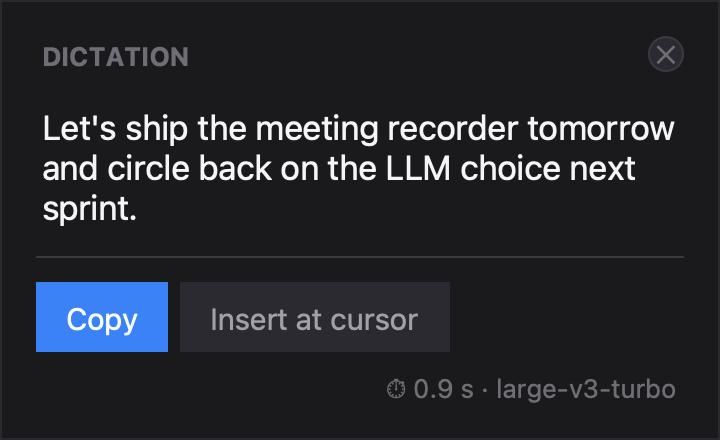
Hold the key and speak, or switch to tap-to-start; the key is yours to choose. Your words are on the clipboard about a second after you finish. Switch on Insert at cursor and Saykeep pastes them (⌘V) into the field you were typing in — any Mac app that takes a paste: your editor, your mail, your terminal, your chat. That is what the Accessibility permission is for. On the clipboard path, clipboard-history tools will see your dictation like any other copy.
How it was measured
The on-device decode of a dictation of up to 30 seconds, once the model is warm: median 0.89 s across 101 dictations from the developer's own logs on one Apple M5 Mac (32 GB), Whisper large-v3-turbo on the GPU — fastest 0.6 s, slowest 10.5 s, measured before the text is pasted. Longer dictations take proportionally longer; there is no cap. On a memory-pressured Mac the first dictation after a long idle has taken several seconds longer while macOS paged the model back in; since 0.3.7 that reload starts the moment you press the key (not yet re-measured).
How it was measured
The default models on a 100-sentence sample of the public FLEURS test set per language — read speech, not meeting audio — transcribed on an Apple Silicon Mac with stock settings: roughly one word in twenty wrong, in both languages. Names and specialist terms are where any model slips; that is what the custom vocabulary is for.
How it was measured
Whisper large-v3-turbo for dictation, Whisper large-v3 for meetings, both running on your Mac's GPU through mlx-whisper. Dictation is the model's own output plus your vocabulary fixes — punctuated, but no rewrite pass and no cloud. Dozens of languages, auto-detected per recording or pinned to one in Settings; pick a smaller model there if you want speed over accuracy.
No bot in the call. No cloud behind it.
Start a recording and Saykeep captures your mic and everything your Mac plays, straight from macOS's own audio system — no bot joins the call, no virtual audio driver to install. The capture is system-wide, so it doesn't care which app is talking: Zoom, Meet, Teams, a Slack huddle, a browser tab. Zoom is what the developer records with every day. For meetings, macOS asks for two permissions: Microphone and System Audio Recording.
Don’t trust us. Verify.
Most apps say “private.” Saykeep is built so you can check. We publish NETWORK.md, the complete list of every network connection the app is capable of making. Saykeep is closed-source, so instead of “read the code,” the promise is auditable on the wire: the list is short, and you can watch it yourself. Here it is.
That is the whole list. Nothing else opens a socket: no account, no telemetry, no crash reporting, no licence phone-home. If you ever see a connection that isn't here, that's a bug — tell us.
Yours, permanently
One payment. All local features. Every machine you personally use.
Buy once, own it. What the alternatives cost:
If we disappeared tomorrow, the copy on your Mac keeps working.
Your recordings, transcripts and summaries are ordinary files in your own folder, in open formats you can read without us.
Nothing the app does day to day needs our servers. Software you bought stays software you own.
A future v2.0 would be an optional paid upgrade at an owner discount. That’s how development stays funded without a subscription, and your v1 licence keeps working forever.
Questions
Is it legal to record my meetings?
It depends on where you and the other participants are — some places require all-party consent (Germany; California and other US states). Saykeep makes recording unmistakably visible so consent is possible: the indicator is always on while a meeting records, and your first meeting shows a consent notice. Obtaining the actual consent is up to you. See the full FAQ; this is general information, not legal advice.
Is local speech recognition accurate enough?
We measured it rather than asserting it: on a 100-sentence sample of the public FLEURS test set per language, the default models reached roughly 5 % word error rate in English and in Polish — read speech, so real meetings score worse. Argmax's WhisperKit paper (arXiv 2507.10860) benchmarked its own build of the same model family on-device against the major cloud services and matched or beat them in that test (one English read-speech set). Names and jargon are where every model stumbles, which is what the custom vocabulary is for; transcripts are plain text you can edit. The 30-day trial is the honest way to check your own language.
Known issues?
Two worth knowing before your first call. Starting or ending a call in another conferencing app while a recording is running can knock out your Mac's audio for several minutes — it has taken up to ten — until macOS recovers; stop the recording first. If it happens it affects the whole machine rather than Saykeep alone — other apps can lose audio too — and restarting Saykeep usually does not clear it; the reliable fix is sudo killall coreaudiod, which the app tells you when it detects the condition. And the transcript appears only after speaker labelling finishes: roughly 35 minutes for an hour-long call on the Mac we measured, scaled from a 17-minute recording, in the background.
“Saykeep exists because I wanted exactly this and couldn't find it in the shape I wanted: dictation and meeting notes that stay on my machine, from software I own instead of rent. I've used it every working day since I built it.”
— Piotr Januszek, maker of Saykeep